
It loads in every major DAW
Before you even think about the sound, make sure the plugin shows up where you need it. Murda Melodies installs as AU, VST, VST3, and AAX, so it fits into Logic, Ableton, Pro Tools, and practically any DAW on a Mac. It's built for Apple Silicon and calls for macOS 11 or newer.
Pick a preset and start twisting
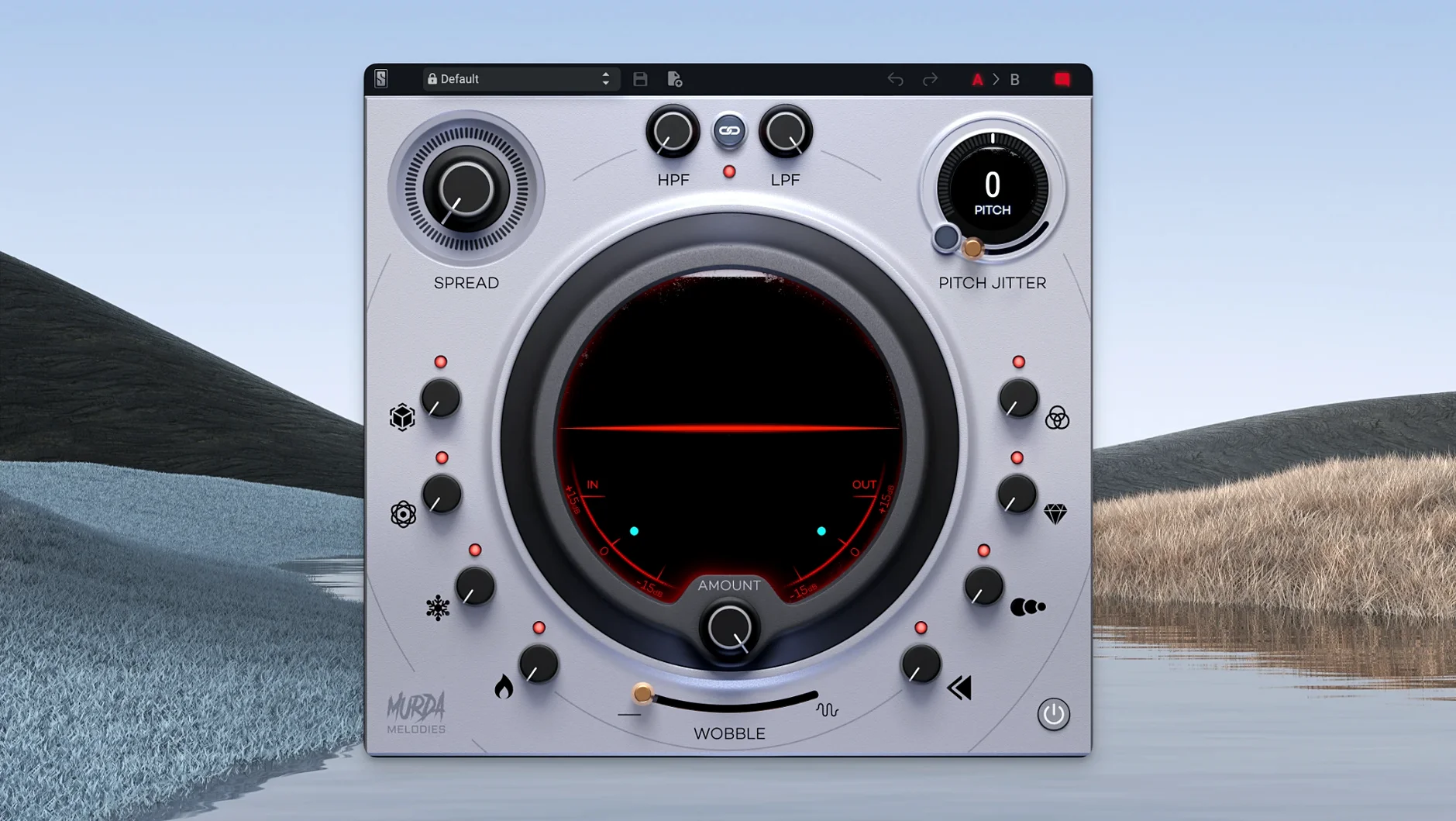
The plugin opens with more than 50 presets from Murda Beatz and the Slate team, covering everything from subtle texture to melted tape. Eight main controls sit up front—no sub-menus, no digging. Grab the four-octave pitch shifter or dial in some vinyl wobble and the whole mood shifts in a few seconds.
Spread and destabilize the sound
A stereo widener that stays mono-compatible lets you push a vocal or keys wide without the mix collapsing in a club system. For grittier flavors, the Pitch Jitter control introduces the kind of nonlinear artifacts you'd get from an old sampler or a warped record, without burying the source.
Building a vocal chop from scratch
Say you've got a dry vocal phrase sitting in your DAW and it's feeling flat. Here's how I'd turn it into something worth repeating. Start by pulling up an empty Murda Melodies on the track and dialing the mix fully wet so you hear exactly what the plugin is doing. Flip the reverse processor on for a quick swell into the phrase—this gives you that backward-tape push that trap hooks lean on. Next, bring the pitch shifter down seven semitones and add a touch of Pitch Jitter, just enough to make the take sound like it came off old gear. From there, tap the delay to a dotted-eighth sync and let the repeats trail off behind the phrase. Add the vinyl wobble at about 20% and roll the high-pass filter up to 400 Hz so the low end stays clean for your 808. Save the result as your own preset and you've got a go-to for stacking ad-libs.
This is not a surgical tool
The most common mistake I spot—and I did this myself—is treating Murda Melodies like a surgical tool. It isn't an EQ or a clean compressor. Crank every knob expecting subtle results and you'll wash a mix out in thirty seconds. Another one: ignoring the mono-compatible widener. Producers widen a melody on headphones, then play it back in the car and wonder where the hook went. Flip the mono switch while you're dialing it in, and you'll hear the truth. Beginners also forget that the pitch shifter feeds the delay and reverb, not the other way around. If your pitched signal is fighting the wet effects, back the shifter off a few cents before you touch the verb level.
A late-night session with a stuck beat
Last week I had a beat running that felt too clean for the artist who was coming through. Kick and snare were knocking, but the melody loop sounded like a stock demo. I opened Murda Melodies on the melody bus around midnight. Stayed on the first preset for maybe ten seconds before I started pulling knobs. The low-pass filter came down until the synth lost its edge, then I nudged the pitch up a fifth and layered in a synced eighth-note delay. Pitch Jitter went to about 15%—just enough wobble to make the part feel unstable in a good way. I added reverb behind the repeats with a short decay so the space felt small and sticky. The vinyl effect barely registered on its own, but bypassing it made the whole thing flat again, so it stayed. A few minutes later I had the loop sitting under the vocals and the whole track finally had the grit I'd been chasing. The artist never knew I'd been stuck for two days.
Bottom line: you can wrestle a dead melody for hours, or you can run it through eight knobs and find the texture that makes the track breathe.
- macOS 11 or later
- Apple Silicon
- Interface languages: English
Questions I actually get
What does the Pitch Jitter control do?
It adds unstable, nonlinear pitch artifacts similar to a glitchy sampler or a worn-out tape machine, giving melodies an unpredictable edge.
Is the stereo widener safe for mono playback?
Yes, version 1.0.8 added mono-to-stereo compatibility in AAX and AU, so the effect folds down cleanly to a single speaker without phasing issues.
Notes from the tables 0
Sign in or pull up a chair to leave a note.
No notes on this one yet. They go up after I read them.
More from the VST Plugins page
The whole page VST Plugins 40 MB
Slate Digital Storch Filter
1.0.6
VST Plugins 40 MB
Slate Digital Storch Filter
1.0.6
 VST Plugins 69 MB
Slate Digital Submerge
1.0.5
VST Plugins 69 MB
Slate Digital Submerge
1.0.5
 VST Plugins 38 MB
ShaperBox
3.6.1
VST Plugins 38 MB
ShaperBox
3.6.1
 VST Plugins 111 MB
Sonic Academy KICK
1.1.8
VST Plugins 111 MB
Sonic Academy KICK
1.1.8
 VST Plugins Updated 358 MB
Serum
2.0.24
VST Plugins Updated 358 MB
Serum
2.0.24
 VST Plugins Updated 30 MB
Serato Sample
2.2.0
VST Plugins Updated 30 MB
Serato Sample
2.2.0
 VST Plugins 612 MB
Spire
1.5.19
VST Plugins 612 MB
Spire
1.5.19
 VST Plugins 158 MB