
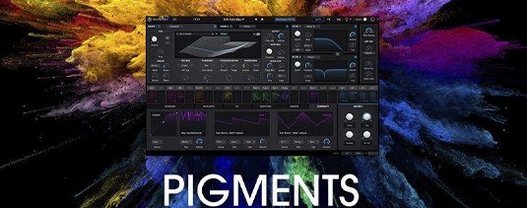
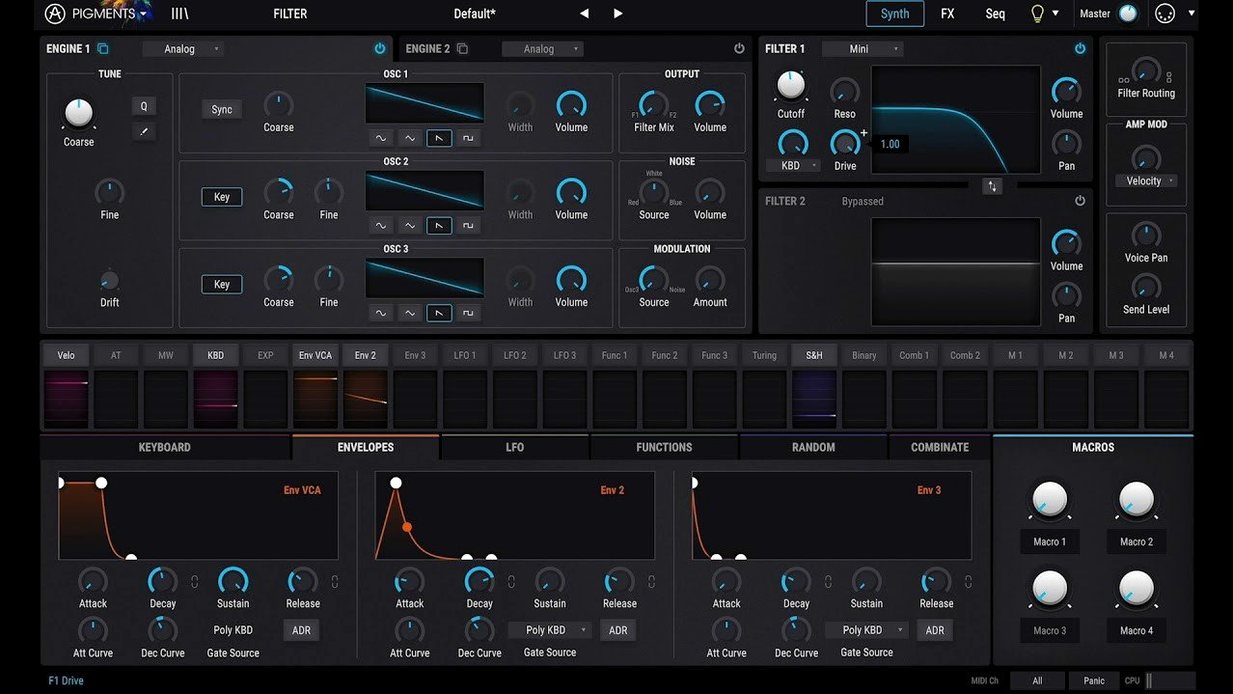
Six synthesis engines sit under one color-coded roof. That's the first thing you notice about Pigments — not a spec sheet, but a layout that keeps wavetable, virtual analog, and four other engines within reach without scrolling through menus.
Drag filter cutoff onto an LFO in one move
- Engine mix: blend a wavetable sweep against a warm analog-style oscillator. The color coding tells you which engine is talking.
- Drag-and-drop modulation: grab a filter cutoff and drop it onto an LFO. One move, and the sound starts breathing.
- Built-in effects: the new Corroder adds grit that sits behind a pad without burying it. Rage, Ripple, and Reverb filters give you three more ways to shape a patch before it hits the effects chain.
- Factory presets: 150 new ones in 7.0.1, plus extra wavetables, samples, and noises. Good starting points, not destinations.
What that means in a mix
Pigments moves fast when you know what you're after. A bass patch can go from clean to mangled in two drags. The interface doesn't hide the routing — you see the signal path and poke at it directly. For sound design, that's the difference between tweaking a preset and actually building something.
Where Pigments fits in your setup
Pigments runs as a VST, AU, or AAX plugin, so it slides into Logic, Ableton Live, FL Studio, or whatever DAW you call home. It also works standalone when you just want to play without opening a session. On Apple Silicon Macs, it loads as a native process — no Rosetta translation chewing up CPU cycles. The synth recognizes your Mac's audio interface without fuss, and MIDI Learn lets you map any knob to a hardware controller in seconds: right-click, wiggle the physical fader, done.
Integration with macOS is quiet but useful. Pigments respects Core Audio routing, so aggregating devices or sending audio between apps via something like BlackHole works without extra configuration. The plugin also responds to MPE controllers — a ROLI Seaboard or Expressive E Osmose will bend and slide per note, and Pigments tracks it natively.
An afternoon for a film composer
Imagine someone scoring a tense documentary cue. They need a texture that rises for forty seconds, morphs, then collapses into something metallic. Instead of stacking three plugins and automating a dozen parameters, they open Pigments, load a wavetable pad from the new factory set, and drag the wavetable position knob onto a slow random LFO. They route the same LFO to the Corroder's drive, just slightly, so the grit creeps in as the sound climbs. A second engine — the utility engine playing a sampled piano hammer noise — fades in under velocity control. One instance, one MIDI track, no external effects. The cue lands in the timeline before lunch.
Right-click tuning for instant fine control
- Right-click the tuning knob to switch between semitones and fine cents. Faster than hunting for a shift key.
- Double-click any mod source in the routing panel to jump straight to its settings. No scrolling through the modulation tab.
- The sequencer's dice icon randomizes a pattern per lane. Click it a few times with a percussive patch loaded, and you'll land on grooves you'd never program by hand.
- Shift-drag a waveform in the wavetable editor to scrub through the table. Subtle, but way more precise than clicking step buttons.
- The Play Page redesign in 7.0.1 isn't just cosmetic. Macro knobs now reflect what you've assigned at a glance, and the layout works on a laptop screen without squinting.
Plenty of producers grab an arturia pigments free download to test the engines, then stick around once they find these little workflow boosts. Some look for an Arturia Pigments torrent or Arturia Pigments crack — and keeping it current matters when a dot-release like 7.0.1 drops with new filters and tutorials baked in. Whether you arrive via a Pigments VST crack or an Arturia Mac torrent, the synth itself doesn't judge; it just gives you six engines and a screen full of color, waiting for a drag.
The 7.0.1 update is more than a point release. You get a redesigned Play Page, three new filters, and a fresh effect.
- Rage, Ripple, and Reverb filters added.
- Corroder effect for adding texture and grit.
- 150 new factory presets.
- 50 new wavetables, 30 samples, and 20 noises.
- macOS 11 or later
- Apple Silicon or Intel 64-bit Mac
- Interface language: English
Notes from the tables 0
Sign in or pull up a chair to leave a note.
No notes on this one yet. They go up after I read them.
More from the VST Plugins page
The whole page VST Plugins 2.1 GB
Arturia FX Collection
2026.02
VST Plugins 2.1 GB
Arturia FX Collection
2026.02
 VST Plugins 16.1 GB
Arturia Emulator II V
1.6.2
VST Plugins 16.1 GB
Arturia Emulator II V
1.6.2
 VST Plugins 700 MB
Arturia Efx AMBIENT
1.0.0
VST Plugins 700 MB
Arturia Efx AMBIENT
1.0.0
 VST Plugins 285 MB
Arturia Comp FET-76
1.7.1
VST Plugins 285 MB
Arturia Comp FET-76
1.7.1
 VST Plugins 450 MB
Arturia Augmented Voices
2.0.2
VST Plugins 450 MB
Arturia Augmented Voices
2.0.2
 VST Plugins 4.8 GB
Arturia Analog Lab V
5.12.0
VST Plugins 4.8 GB
Arturia Analog Lab V
5.12.0
 VST Plugins 4.4 GB
Arturia Acid V
1.1.5
VST Plugins 4.4 GB
Arturia Acid V
1.1.5
 VST Plugins 542 MB