

Prizmo Pro is a Mac app that turns paper documents, photos, and scanner files into searchable, editable text you can do something with.
Grabs text from scanners, photos, and cameras
- Grabs text from a flatbed scanner, a digital camera, or a photo already on your Mac
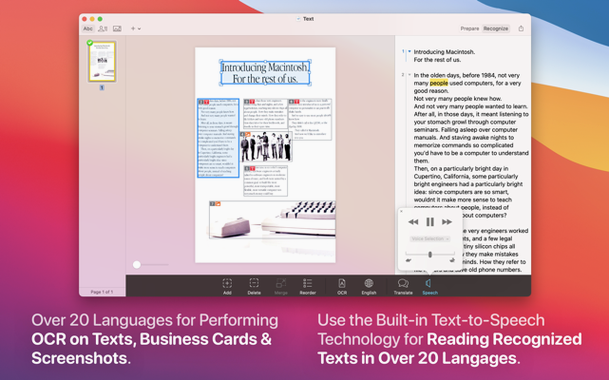
- Recognizes text in 30 languages and can read it aloud in 26
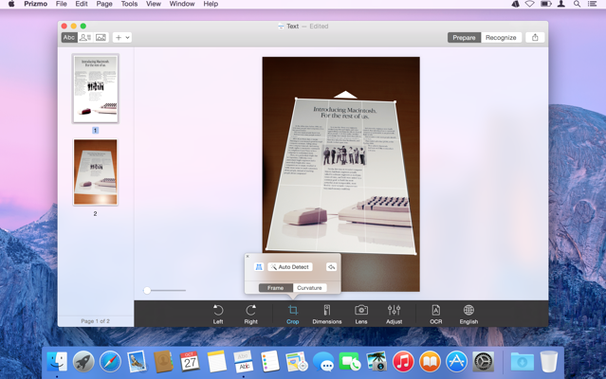
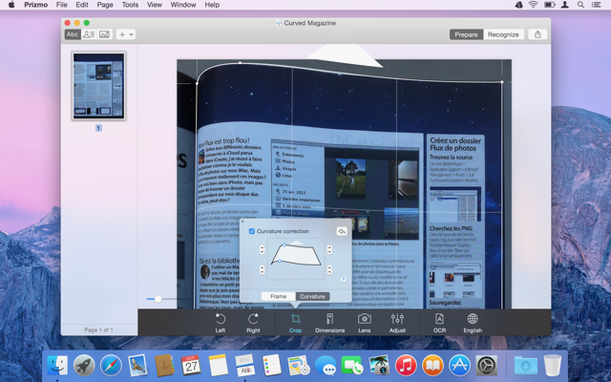
- Straightens curled book pages and fixes skewed perspective so the OCR actually works
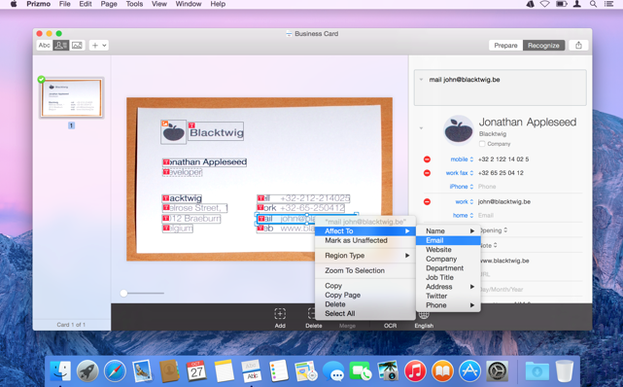
- Lets you edit and correct any misread words right inside the app
- Sends finished documents to Evernote, Dropbox, or Google Drive, or exports as a DOCX file
- Keeps your library in sync across devices with iCloud
The kind of person this fits
This is for somebody who deals with multilingual documents, stacks of old paperwork, or research material that needs to become usable text—not just a picture. If you already own a decent scanner or take careful phone shots of receipts and book pages, Prizmo Pro gives you a clean editing step before the text leaves your desk. It is not a one-click magic trick; you will spend a moment correcting the odd character. But for a small office or a home archive project, it covers the ground well.
Scan a receipt to a searchable PDF, step by step
Here is a real task I do at least once a week. A dinner receipt sits on my desk, and my accountant wants a digital copy with searchable text, not a flat photo.
- Lay the receipt on a dark background near a window. Open Prizmo Pro and choose New from Camera. Let it snap the shot automatically when it detects the edges.
- In the crop screen, drag the corners so the borders hug the receipt. Hit the Perspective button if the paper curled up a little — the grid overlay tells you when it is square.
- Click Recognize. The OCR runs in a few seconds. A side panel shows the extracted text beside the image. Scan for the total and the date; fix any misread digits right there.
- Choose Export as PDF, tick "Searchable PDF," and save it to a folder your accountant can reach. That is the whole thing, under two minutes once you know the buttons.
Two mistakes beginners make
First, people feed Prizmo Pro a blurry phone shot at a weird angle and wonder why the OCR spits out nonsense. Give the app a flat, well-lit image before you complain. A quick tap on the Clean up filter removes shadows and evens out the paper tone, which helps the recognition engine more than you would think.
Second, beginners skip the editing step. They export straight after recognition and then grumble about a wrong character in the final PDF. Build a habit: quickly scan the recognized text panel before you export. It takes thirty seconds and saves you from fixing a document later.
- macOS 10.13 or later
- Works on Intel and Apple Silicon Macs
Questions I actually get
Can Prizmo Pro read text out loud?
Yes, it includes text-to-speech and can read documents aloud in 26 languages.
What cloud services does Prizmo Pro work with?
It integrates directly with Evernote, Dropbox, and Google Drive for saving and sharing your scans.
Notes from the tables 0
Sign in or pull up a chair to leave a note.
No notes on this one yet. They go up after I read them.
More from the Photo page
The whole page Photo 40 MB
Pixelmator Pro
4.3
Photo 40 MB
Pixelmator Pro
4.3
 Photo 641 MB
PhotoScape X Pro
4.3
Photo 641 MB
PhotoScape X Pro
4.3
 Photo 452 MB
Photomator
3.4.15
Photo 452 MB
Photomator
3.4.15
 Photo Updated 662 MB
Photo Mechanic
2025.1.8239
Photo Updated 662 MB
Photo Mechanic
2025.1.8239
 Photo 64 MB
Perfectly Clear WorkBench
4.8.0.2871
Photo 64 MB
Perfectly Clear WorkBench
4.8.0.2871
 Photo 200 MB
ON1 Photo RAW
2026.5.2 v20.5.2.19304
Photo 200 MB
ON1 Photo RAW
2026.5.2 v20.5.2.19304
 Photo 1.1 GB
Luminar Neo
1.26.0
Photo 1.1 GB
Luminar Neo
1.26.0
 Photo 3.8 GB