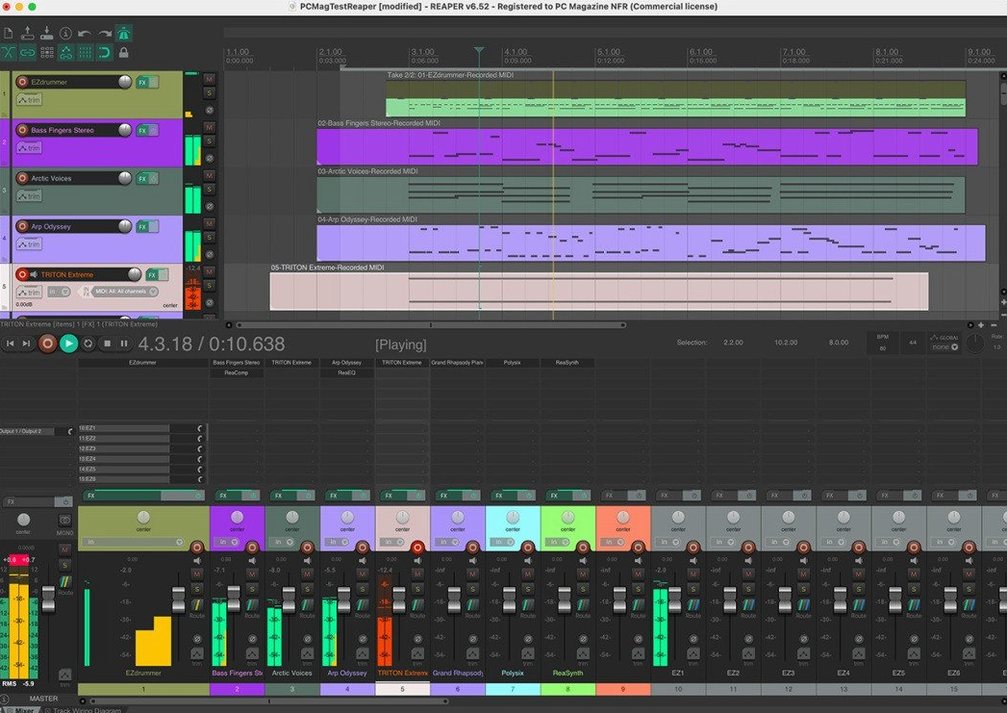
If you've used a simple tape-machine app and found yourself hitting a wall when you needed to route a reverb send or freeze a drum bus, that's where this steps in. REAPER doesn't separate tracks, buses, and instruments into different creature types—it's one flexible track that can wear any hat you give it.
Tracks that do whatever the job needs
There's no menu to pick a "bus track" or "folder track." You just drag a track above a few others and click the folder button. Now it's a group master. You can slap processing on it, record its output to freeze a dense drum mix non-destructively, or route it to one of up to 512 hardware outputs. It's the same straightforward logic whether you're tracking a singer-songwriter, a five-piece band, or a full orchestra with a forest of microphones.
One toolbox for the whole build
From dropping in a reference track to tweaking a MIDI string arrangement, everything lives in the same environment. You can import audio, sketch a part with a virtual instrument, edit a take with razor-sharp precision, and mix it down without ever switching modes. The same version of the software serves everyone, so a bedroom producer and a post-production house are essentially looking at the same knobs and faders.
Cold launch in under three seconds
On my M1 machine, REAPER launches cold in under three seconds—faster than most text editors. A sixty-track session with a few instances of ReaVerb and a couple of heavy synth plugins barely nudges the CPU meter past twenty percent. It's not flashy software, and that's exactly why it stays quick. The installer is under thirty megabytes, the app doesn't phone home, and I've never seen a beach ball during playback, even when I accidentally stacked three convolution reverbs on a snare before coffee.
Memory use stays modest. That same sixty-track project sits around 1.2 GB of RAM, which leaves plenty of room for a browser full of tutorial tabs and a video call. The developers seem allergic to bloat, and the result is a DAW that feels like a well-tuned kitchen knife rather than a gadget-packed food processor.
Build the signal path yourself
The biggest stumble is treating the routing window like a maze and giving up before it clicks. REAPER doesn't hand you a pre-built template with labeled buses—you build the signal path yourself. New users often record a dozen takes and wonder where they went, not realizing the takes are stacked inside a single item ready to be exploded or comped with a right-click.
- Ignoring the right-click menu. Nearly everything lives there. Track controls, item properties, routing options—if you can't find a feature, right-click the thing you want to change.
- Not setting up auto-save. The app is rock solid, but a power cut doesn't care. Turn on time-stamped backups in preferences on day one.
- Dragging media from the Finder instead of using the Media Explorer. The built-in browser previews audio in sync with the project tempo and lets you audition loops before you commit.
Arm the little speaker icon first
A silent track usually means the input monitoring button isn't armed—it's the little speaker icon on the track panel. If you still hear nothing, check that your audio device is selected under Preferences > Audio > Device. REAPER talks to your interface directly, and it won't guess which one you meant.
Plugin windows disappearing behind the arrange view trips people up too. Tick the "float plugin windows" pin in the FX chain window and they'll stay visible. If a third-party plugin crashes, REAPER quarantines it without taking the whole session down—you'll see a warning next time you open that project, and you can remove the offending plug-in from a safe mode dialog.
When latency makes a vocal take feel sluggish, drop the block size in the audio device settings while tracking, then raise it again for mixing. The setting is right on the main toolbar if you customize it there, which saves a trip through the preferences menu every time.
- macOS 10.15 or newer
- Runs on Intel and Apple Silicon Macs
Questions I actually get
Can I use REAPER with my audio interface?
Yes. With an audio interface and a microphone, it turns your Mac into a recording studio, supporting up to 512 channels of hardware input and output.
Does REAPER handle MIDI or just audio?
It handles both. You get multitrack audio and MIDI recording, editing, processing, and mixing tools in one application.
Notes from the tables 0
Sign in or pull up a chair to leave a note.
No notes on this one yet. They go up after I read them.