
Mastering engineers and detail-obsessed mixers lean on Insight 2 when they need a second set of eyes. It doesn't color the sound at all — it just paints a clear picture of what's happening across the stereo field, the frequency spectrum, and the loudness standards you're targeting.
Spot loudness trouble before it leaves the room
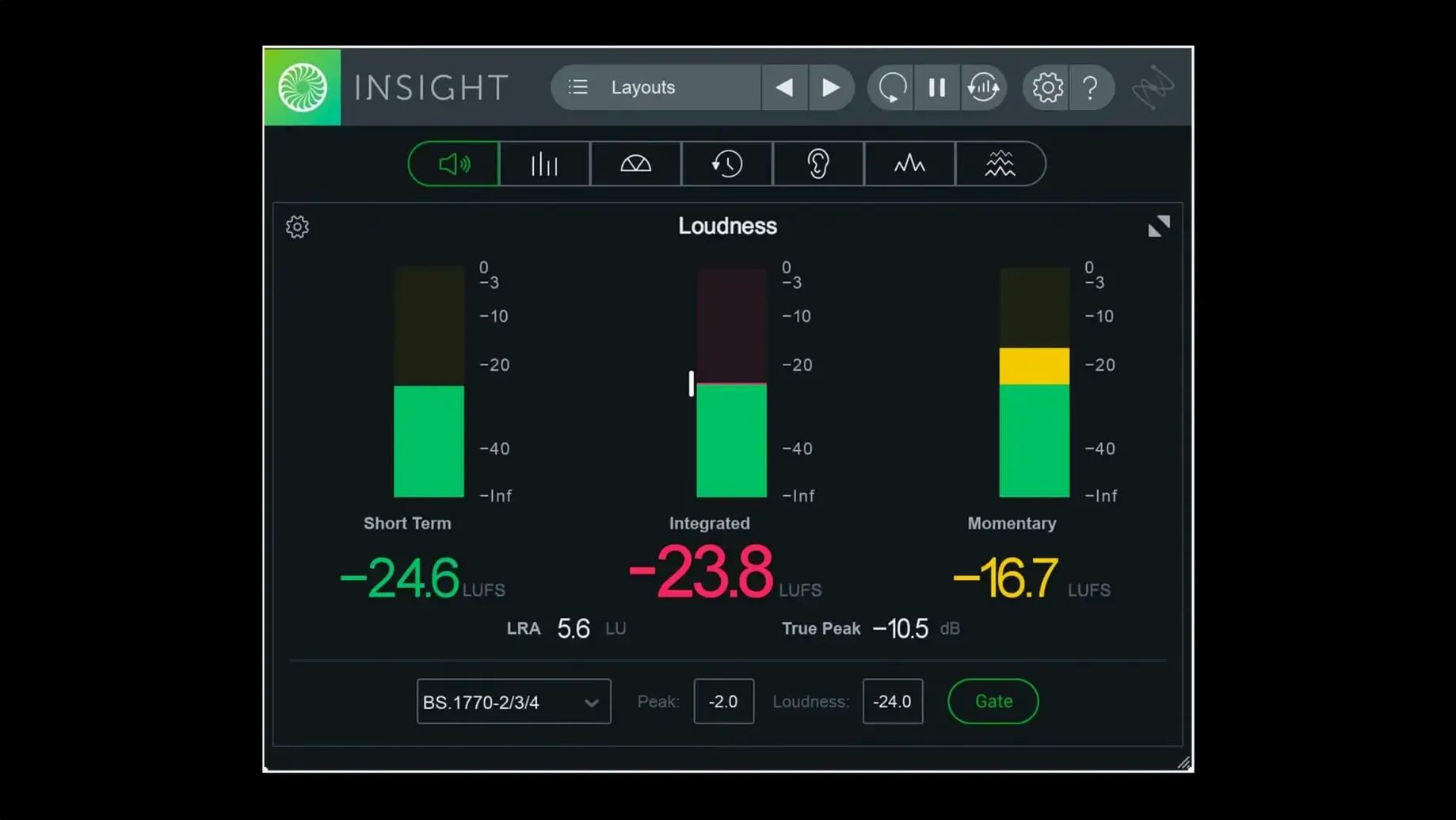
Run your mix through the Loudness Meters and History Graph while you make EQ moves. The numbers update in real time, showing you exactly how close you are to broadcast specs or the integrated level of your reference track.
See where the low end is building up
Open the 2D Spectrogram or Spectrum Analyzer on your drum bus. You'll watch kick drums and bass lines overlap in ways that sounded fine on small speakers but turn into mud on a big system. The color gradients make problem zones hard to ignore.
Check phase without guessing
Throw the Stereo Vectorscope on your master fader and play a section with wide synth pads. If the pattern collapses into a flat line instead of a nice fuzzy ball, you've got mono compatibility issues to chase down before anyone hears this in a club.
Set up your meters so you actually use them
The first day with Insight 2 can feel like staring at a cockpit dashboard. The trick is shrinking the window to show only what you need for the task at hand. Resize the interface and park a single Loudness Meter next to your master fader — you'll check it constantly without it eating screen real estate. Save that stripped-down view as a custom preset so you're not rebuilding it every session.
Another habit worth forming early: route the plug-in from your reference track's bus, not just the master. That way you can A/B your mix against a commercial release and watch the Loudness History Graph trace both curves at once. It turns a vague "my mix feels quieter" into a concrete number you can act on.
Mistakes that send beginners in circles
The biggest one I see is staring at the Spectrum Analyzer while mixing into headphones. The graph shows sub-bass energy you aren't actually hearing, so you end up thinning out a kick drum that was fine all along. Use the 2D Spectrogram instead when you're on cans — the time dimension keeps you grounded in what's happening moment to moment rather than some averaged curve.
Another common stumble: chasing the True Peak meter down to exactly -1.0 dBTP and calling it done. Broadcast specs have tolerance ranges for a reason. If you're brickwalling your limiter to shave off the last half-decibel, you're probably doing more damage than good. Set the meter's color warning to yellow at -3 dBTP and red at -1.5, then mix with your ears.
Folks grabbing an iZotope Insight 2 torrent sometimes skip reading the included install notes and drop the plug-in into the wrong folder. If your DAW doesn't see it after a rescan, check that the AAX, AU, and VST3 components landed where your system actually looks for them — Intel and Apple Silicon paths aren't always identical. A clean iZotope Insight 2 free download mac package will have everything labeled clearly, but you still need to point each format to the right directory.
Insight 2.4.0 catches up with the latest machines and workflows. If you've been waiting to run it without Rosetta, your wait is over.
- Native arm64 AAX support for Pro Tools 2023.3+ on Apple silicon Macs.
- Native arm64 installer, so the whole setup feels like a first-class citizen on M-series hardware.
- Factory and custom preset tabs added to the preset manager for faster recall.
- macOS Big Sur or later
- Intel or Apple silicon Mac
- Language: English
Questions I actually get
What surround formats does Insight 2 support?
It handles everything from stereo up to Dolby Atmos 7.1.2, so you can route and analyze complex multichannel sessions without switching to a different tool.
Can I save my own metering setups?
Yes, custom preset tabs were added to the preset manager. You can save your go-to layout and recall it instantly for different tasks.
Does it run natively on Apple silicon Macs?
Version 2.4.0 added native arm64 support for both the plug-in and the installer, including AAX for Pro Tools 2023.3 and later.
Notes from the tables 0
Sign in or pull up a chair to leave a note.
No notes on this one yet. They go up after I read them.
More from the VST Plugins page
The whole page VST Plugins 545 MB
iZotope Neutron
5.2.0
VST Plugins 545 MB
iZotope Neutron
5.2.0
 VST Plugins 928 MB
iZotope RX
12.0.0
VST Plugins 928 MB
iZotope RX
12.0.0
 VST Plugins 2.1 GB
iZotope Tonal Balance Control
3.0.0
VST Plugins 2.1 GB
iZotope Tonal Balance Control
3.0.0
 VST Plugins 264 MB
Kalifornia Dynamic KD Alkane
1.0.17.0
VST Plugins 264 MB
Kalifornia Dynamic KD Alkane
1.0.17.0
 VST Plugins 270 MB
Komplete FX Bundle
2026.1
VST Plugins 270 MB
Komplete FX Bundle
2026.1
 VST Plugins 3.2 GB
Komplete Kontrol
3.5.4
VST Plugins 3.2 GB
Komplete Kontrol
3.5.4
 VST Plugins 785 MB
KORG Collection
1.0.3
VST Plugins 785 MB
KORG Collection
1.0.3
 VST Plugins 175 MB