

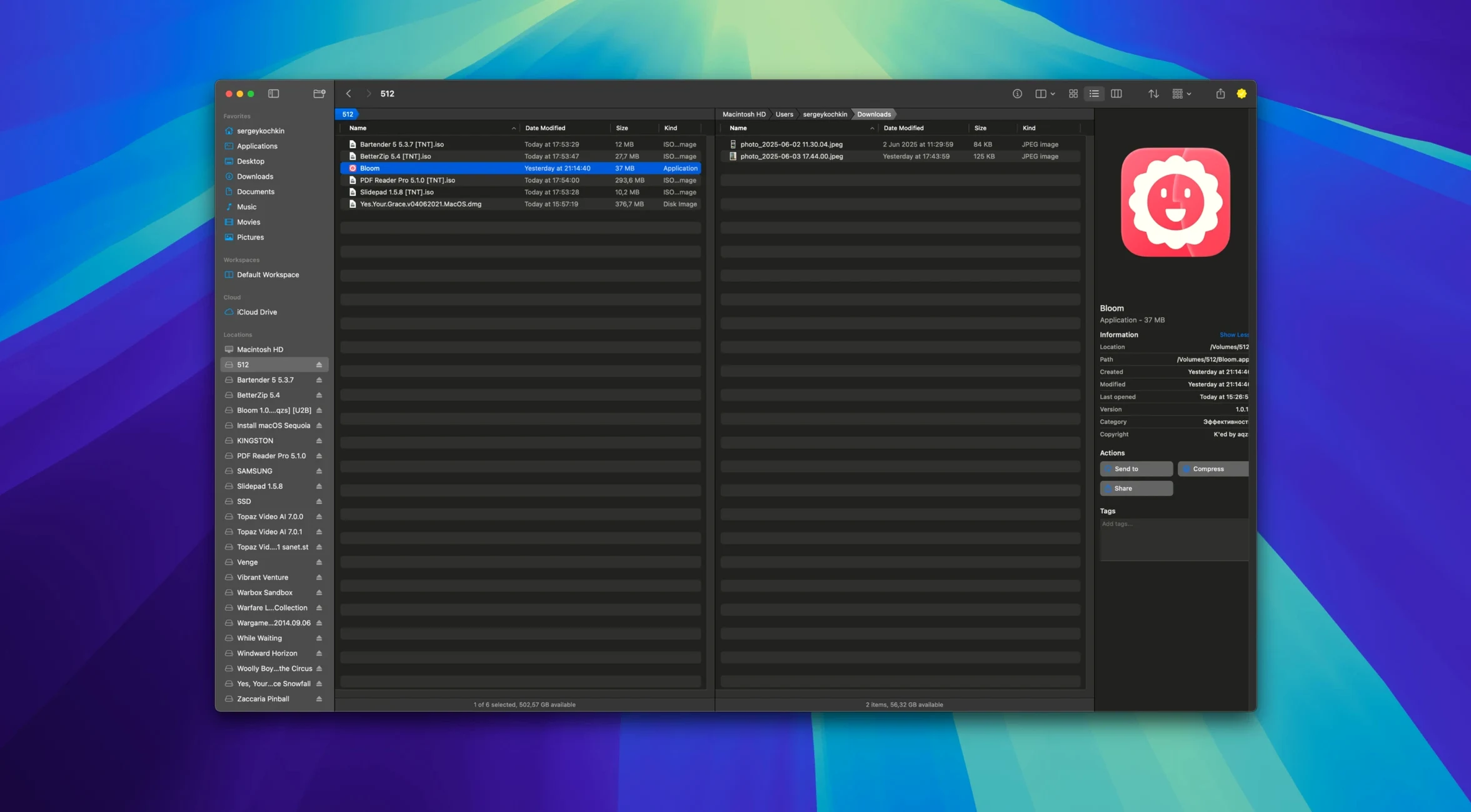
Folks who feel boxed in by Finder tend to gravitate toward Bloom. It’s a fresh take on moving files around, built by the developer INCHMAN1900. If you just installed it, here’s where to start.
Quick Look on Demand — Select any text file, image, or PDF under 10 MB, then tap the Space bar. You get an instant peek without opening another app.
Portal Mode — A compact window that strips away the sidebar and preview pane. It’s just your files, front and center.
Jump to a Folder — Press ⌘⇧⏎ to teleport straight into a system location. No clicking through a dozen nested folders.
Open Terminal Here — Right-click any folder and send it straight to Terminal. Handy when a quick command beats dragging a mouse.
Image Tune-Up — Grab a batch of photos, right-click, and convert or optimize them on the spot. No separate tool required.
Peek Inside Archives — Select a zip or tarball and preview its contents without unpacking a thing. You only extract what you actually need.
Search now picks up where you left off
The most welcome fix in the current build is how search remembers your last location. Earlier versions would reset to the home folder every time — now ⌘F opens right where you are, which cuts a lot of retyping. Portal mode got a small but meaningful upgrade too: the docked window finally respects screen edges on a multi-monitor setup, so it stops sliding into the gap between displays.
Batch renaming with regular expressions used to choke on folders with more than a thousand items. That's smoothed out now. And the treemap view — the one that shows disk usage as colored blocks — redraws noticeably faster on Apple Silicon Macs after this update, especially when you scan a cluttered external drive.
Pin the portal window to stay on top
Bloom ships with sensible defaults, but a few tweaks make it feel more like yours.
- Portal window pinning. Turn this on in Preferences > Workspace. The little window sticks above everything else, so dragging files between apps stops being a juggling act.
- Preview size limit. The default 10 MB cap is fine for most things, but if you regularly eyeball larger PDFs, bump it up. Bloom won't complain — it'll just take a beat longer to render.
- Column auto-resize trigger. Set it to "on selection change" instead of "on window resize." You'll get readable columns when you click around, without the constant shifting every time you nudge the window edge.
- Undo history depth. The out-of-the-box setting is 20 operations. If you shuffle files around all day, raise it to 50. Disk cost is negligible, and you'll be grateful when you rename a folder and realize three moves later that you botched it.
iCloud Drive stubs hide files from search
Search returns nothing in iCloud Drive. macOS sometimes evicts files to save local space, and Bloom can't peek inside a stub. The fix: open System Settings > Apple ID > iCloud and toggle "Optimize Mac Storage" off for a while, let your files sync back, then search again.
Portal window disappears after a restart. This happens when Bloom launches before the screen layout is fully awake. Quit the app, reopen it, and re-pin the Portal window. If you're on a Mac with oeksound bloom torque issues — sorry, wrong bloom — if you're on a Mac with multiple display profiles saved, stick to one arrangement for a day and see if the problem vanishes.
Batch rename preview shows gibberish. You probably left a capture group dangling in your regex pattern. Click the "Test" button before committing; Bloom highlights unmatched items in red. If you grabbed a Bloom kshmr Mac torrent and the app feels off, make sure you've got the full build with all its resource files intact before troubleshooting further. Regex won't help you there.
Treemap scan hangs on a network drive. Unmount the drive, reconnect it, and run the scan again with "Skip hidden folders" checked. Samba shares in particular love to trip on dot-files that Macs sneak onto the volume.
- macOS 14 or newer
- Apple Silicon or Intel 64‑bit Mac
Questions I actually get
Can I schedule file operations in Bloom?
Yes, Bloom includes a task scheduler so you can set up copies, moves, or other jobs to run at a later time.
Can I customize how the workspace looks?
Absolutely. You can tweak the layout, use automatic column resizing, and save your preferred workspace arrangement.
Notes from the tables 0
Sign in or pull up a chair to leave a note.
No notes on this one yet. They go up after I read them.
More from the Mac Apps page
The whole page Mac Apps 584 MB
Bootstrap Studio
6.7.3
Mac Apps 584 MB
Bootstrap Studio
6.7.3
 Mac Apps 159 MB
BetterZip
6.0.6
Mac Apps 159 MB
BetterZip
6.0.6
 Mac Apps 25 MB
BetterTouchTool
6.726
Mac Apps 25 MB
BetterTouchTool
6.726
 Mac Apps 61 MB
BricsCAD
24.2.04-05-1
Mac Apps 61 MB
BricsCAD
24.2.04-05-1
 Mac Apps 1.1 GB
BetterMouse
1.7.8995
Mac Apps 1.1 GB
BetterMouse
1.7.8995
 Mac Apps 7 MB
BetterDisplay Pro
5.0.6
Mac Apps 7 MB
BetterDisplay Pro
5.0.6
 Mac Apps 16 MB
Caffeinated
3.2.0
Mac Apps 16 MB
Caffeinated
3.2.0
 Mac Apps Updated 18 MB