

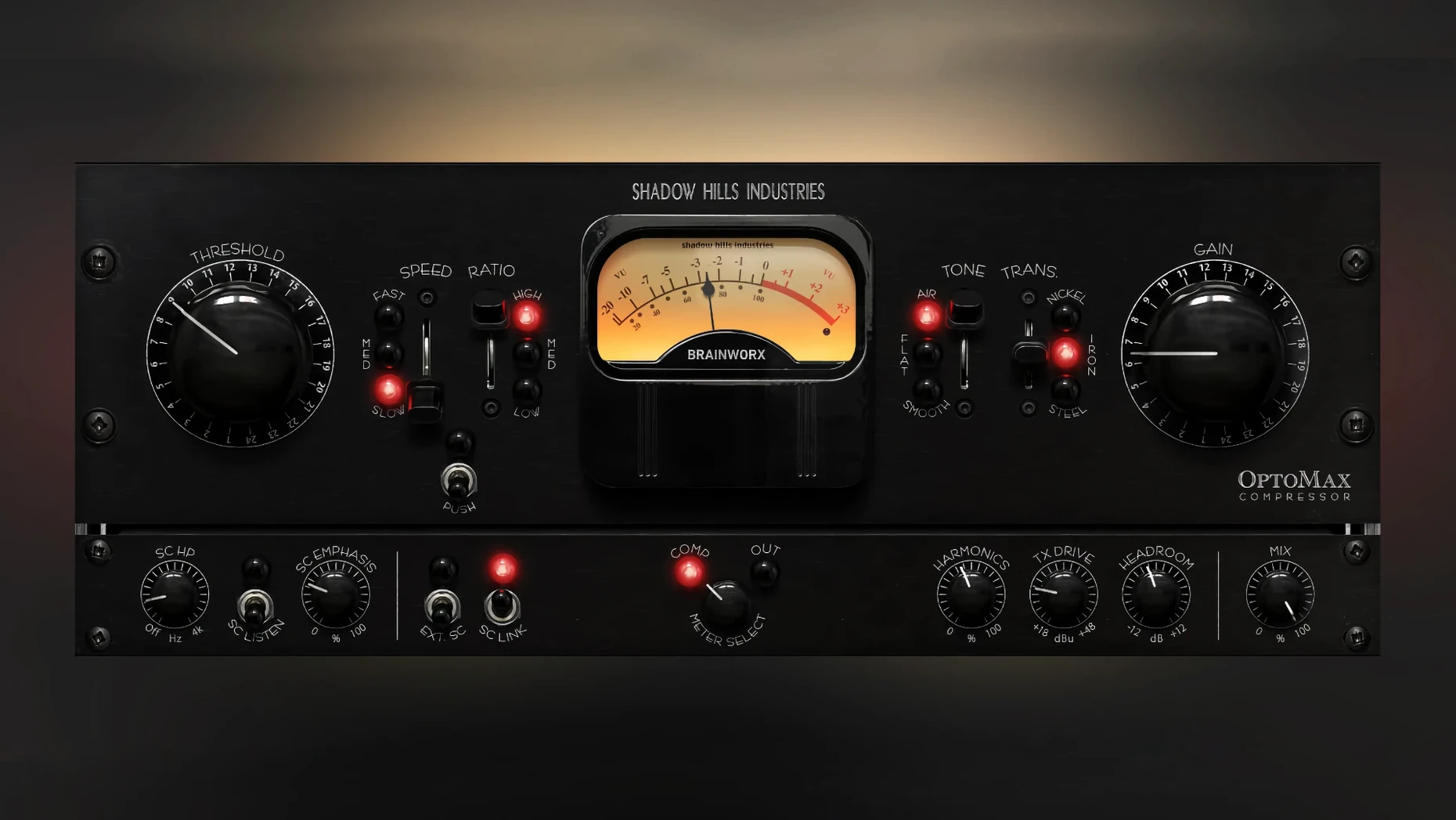
That Softness switch is where the air lives. OptoMax takes the optical heart from the Shadow Hills Mastering Compressor and puts it in a focused plugin that fits right alongside your channel strips and EQs. It does the heavy lifting with gentle leveling or grabs peaks when you need it, without making you feel like you're piloting a spaceship. Here's how it earns a slot in a working session:
- Optical response flavors. Slow, medium, and fast settings give you three distinct ways to shape a signal, from gluey vocal smoothing to snappy drum control.
- Softness high-frequency mode. It tucks the top end back into place, so a bright acoustic guitar or sibilant vocal sits right without extra de-essing.
- Parallel mix knob. Blend the compressed and dry signals right on the faceplate. Useful for drums and full mixes where you want weight but not squash.
- Sidechain filtering. Tighten up the low end by telling the compressor to ignore the kick drum, or duck a bass line against the kick with the advanced sidechain.
- Anywhere compression. Drop it on a single vocal, a bus of backing instruments, or the master fader. It stays musical at all three levels.
It's a single-purpose tool that plays nicely with the rest of your plugin folder. No crossover matrices, no hidden menus — just a handful of well-chosen controls that do what the labels say.
OptoMax next to a few familiar faces
If you already own a few optical-style compressors, you're probably wondering where this one fits. Compared to UAD LA-2A, OptoMax is less about thick vintage color and more about tightening the edges while keeping the core intact. The LA-2A does that pillowy tube thing beautifully on vocals, but it won't give you three transformer types or a sidechain filter. OptoMax is cleaner by nature, though the iron transformer nudges it closer to that older-school warmth when you want it.
Stack it against Klanghelm MJUC and the difference gets clearer. MJUC covers a lot of ground with its three models, including some variable-mu territory OptoMax doesn't touch. But OptoMax pulls ahead on the top end — neither the MJUC's mk1 nor mk2 modes give you anything like the Softness control. If you find yourself chasing harsh cymbals or brittle vocals after compression, OptoMax solves that inside the plugin instead of making you patch an EQ downstream.
Then there's the original Shadow Hills Mastering Compressor plugin — OptoMax is basically its optical section pulled out and given room to breathe. The full Shadow Hills plugin includes a discrete compressor stage and three output transformers, but OptoMax is lighter on CPU, quicker to dial in, and feels more at home on individual tracks where the big one might be overkill.
Twelve instances, no fan spin on Apple Silicon
On an Apple Silicon machine running Logic Pro, the plugin sits comfortably in a busy session. I threw it across twelve tracks — vocals, acoustic guitar, drum bus — and the fan didn't flinch. It's not the lightest optical compressor out there, but it's well within reason for something modeling transformers and sidechain filtering in real time. Intel Macs handle it fine too, though projects above 30 tracks will benefit from freezing a few anyway. Latency is low enough that I didn't feel the need to toggle low-latency mode while tracking through it.
Stability is what you'd expect from a 1.0.0 release from Brainworx — solid. No crashes on insert, no GUI glitches when switching between presets, and no audible thumps when engaging the sidechain filter. The installer is a straightforward disk image and a standard installer package. Once it's in place, the plugin shows up in AU, VST3, and AAX formats without extra fiddling.
- macOS 12 or newer
- Apple Silicon and Intel Macs
- English interface
Questions I actually get
Is OptoMax the same as the full Shadow Hills Mastering Compressor?
No, it focuses specifically on the optical compressor section from that unit, giving you that tone in a simpler, standalone plugin.
Can I use this on a full mix?
Yes, the gentle optical action and parallel mix control make it a solid choice for adding cohesion across a finished mix.
Notes from the tables 0
Sign in or pull up a chair to leave a note.
No notes on this one yet. They go up after I read them.
More from the VST Plugins page
The whole page VST Plugins 2.1 GB
Pulsar Audio IPA
1.0.9
VST Plugins 2.1 GB
Pulsar Audio IPA
1.0.9
 VST Plugins 75 MB
RC-20 Retro Color
1.5.1
VST Plugins 75 MB
RC-20 Retro Color
1.5.1
 VST Plugins 170 MB
reFX Nexus
5.5.21
VST Plugins 170 MB
reFX Nexus
5.5.21
 VST Plugins Updated 72 MB
Revoice Pro
5.1.30
VST Plugins Updated 72 MB
Revoice Pro
5.1.30
 VST Plugins 39 MB
Output Portal
1.2.1
VST Plugins 39 MB
Output Portal
1.2.1
 VST Plugins 319 MB
RipX DAW Pro
8.0.3
VST Plugins 319 MB
RipX DAW Pro
8.0.3
 VST Plugins 1.6 GB
Roland Cloud Legendary Series
2025.06.29
VST Plugins 1.6 GB
Roland Cloud Legendary Series
2025.06.29
 VST Plugins 1.3 GB