

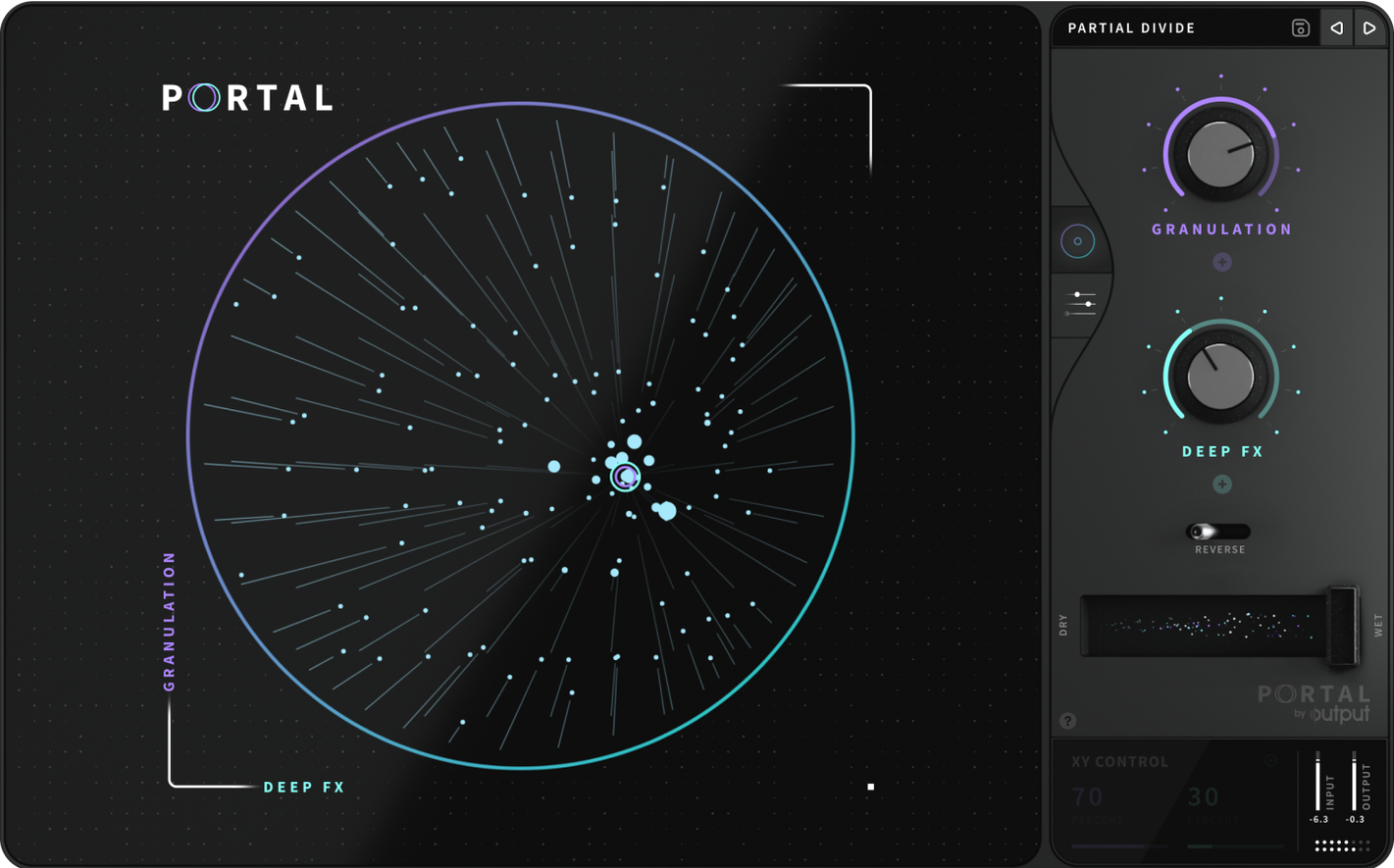
You've got a flat synth line or a vocal take that's just sitting there. Portal grabs that audio and runs it through a granular engine, pulling out textures, grains, and pitched layers the original never had.
Grain playback — tiny slices of your input, rearranged and overlapped in real time.
Pitch shift — change the tone without stretching the timing out of sync.
Scale lock — snap every grain to a musical key so nothing sounds sour.
Re-synthesis — the output stays glued to the vibe of your original sound instead of floating off into noise.
Drop it on a drum bus and nudge the grain size. Run a piano through it with the scale locked to D minor. It's a quick way to hear what the plugin actually does before you start twisting every knob.
Open a session, load Portal on an insert, and feed it something simple — a dry guitar note held for a few seconds. Turn the main grain dial while the note rings. That single gesture tells you more than reading the manual twice.
How a first play-through usually goes
- Pick a track that already sounds okay on its own — a Rhodes chord stab, a vocal hum, a rim shot. Portal works best when you give it something to chew on, not a wall of noise.
- Set the mix knob to 50% wet so you can hear the original against the grains. You'll want to hear what's slipping away and what's being added.
- Ignore the fancy modulation section for now. Grab the grain size fader. Short grains turn your input into shards; long grains smear it like tape slowed to a crawl.
- Tap the tempo sync button on and off once. Synced grains lock to your beat grid. Unsynced grains drift — perfect when a hi-hat pattern needs an uneasy shimmer.
- Pull the pitch knob a few cents sharp, then drop it a fifth. You'll hear the plugin re-synthesizing instead of just pitch-shifting. It doesn't sound like a cheap transpose; it sounds like the note was always meant to sit there.
- Toggle the scale lock and pick a key. Hit a wrong note on purpose — Portal bends it back into tune. That's the re-synthesis engine holding the reins.
- Add a little envelope variation. Each grain gets a slightly different attack and release, so the tail of a vocal phrase breathes instead of buzzing like a broken radio.
first days with Portal — what actually helps
Don't treat it like a reverb. Portal doesn't bloom behind a sound; it pulls the sound apart and reassembles it in front of you. Keep the early experiments short.
- Start with raw sources. A sine wave from any soft synth, a single kick hit, a voice memo. Portal has more to work with when the input is uncluttered. Stacked pads turn into mush fast.
- Ride the dry/wet mix constantly. Small grains tucked just behind a vocal can add breath without stealing clarity. Assign the mix to a MIDI knob and record the automation by hand.
- Freeze grains on purpose. Turn off grain motion and let one slice loop. It becomes a sustain pedal for sounds that don't naturally sustain — drum transients, plucks, spoken words.
- Audition the scale lock early. Before you build a whole progression, lock grains to the key you're writing in. It saves you from falling in love with a texture that clashes the moment the bass moves.
- Save two presets on day one. One for tight rhythmic grains, one for slow cinematic washes. You'll reach for them faster than the factory library when a deadline is breathing down your neck.
If you grabbed the portal mac torrent to try it out, spend the first evening just running the same four-bar loop through those two presets and adjusting the grain size. The character of the plugin lives in that one parameter more than anywhere else.
Bowing a violin into an unwound sci-fi drone
Say you're working on a sci-fi short and need a drone that feels organic — not a synth pad, something closer to a cello being slowly unwound. You have thirty seconds of bowed violin, recorded dry in a bedroom, no processing.
Load Portal on the track. Stretch the grain size to around 400 milliseconds, unsync it, and drop the pitch an octave. The bow noise becomes a dark, groaning texture. Turn on the scale lock in C minor so the low rumble stays musical. Add envelope variation so each grain attack feels slightly different — like a quartet playing the same note with imperfect timing. Pan the wet signal slightly left and the dry signal right. The room fills up.
Now automate the grain size to shorten during a tense scene transition. The drone tightens into a nervous flutter, then relaxes again when the camera settles. That's one violin and one instance of Portal doing the work of a whole Kontakt library.
If you picked up the Output Portal torrent for experiments exactly like this, the plugin earns its keep the moment you stop thinking of it as an effect and start treating it as a re-synthesis instrument. Feed it anything. It will give you back something you didn't record.
- Works on Intel and Apple Silicon Macs.
- Available in English.
Questions I actually get
Is Portal an instrument or an effect?
It's an effects plugin. You feed it audio and it reshapes the signal using granular processing, rather than generating sounds from scratch.
Can I change a sound's key without affecting its tempo?
Yes. The pitch-shifting controls let you move the tone up or down while keeping the original duration and rhythm locked in place.
Notes from the tables 0
Sign in or pull up a chair to leave a note.
No notes on this one yet. They go up after I read them.
More from the VST Plugins page
The whole page VST Plugins 205 MB
Nudist Audio Nudistort
1.2.5
VST Plugins 205 MB
Nudist Audio Nudistort
1.2.5
 VST Plugins 45 MB
noteGRABBER
2.0.0
VST Plugins 45 MB
noteGRABBER
2.0.0
 VST Plugins 35 MB
Plugin Alliance Brainworx Bundle
2025.06.16
VST Plugins 35 MB
Plugin Alliance Brainworx Bundle
2025.06.16
 VST Plugins 2.1 GB
Plugin Alliance Shadow Hills OptoMax
1.0.0
VST Plugins 2.1 GB
Plugin Alliance Shadow Hills OptoMax
1.0.0
 VST Plugins 73 MB
Neural DSP Soldano SLO-100 X
1.0.0
VST Plugins 73 MB
Neural DSP Soldano SLO-100 X
1.0.0
 VST Plugins 340 MB
Neural DSP Parallax X
1.0.0
VST Plugins 340 MB
Neural DSP Parallax X
1.0.0
 VST Plugins 179 MB
Neural DSP Fortin Nameless Suite X
1.0.1
VST Plugins 179 MB
Neural DSP Fortin Nameless Suite X
1.0.1
 VST Plugins 441 MB