

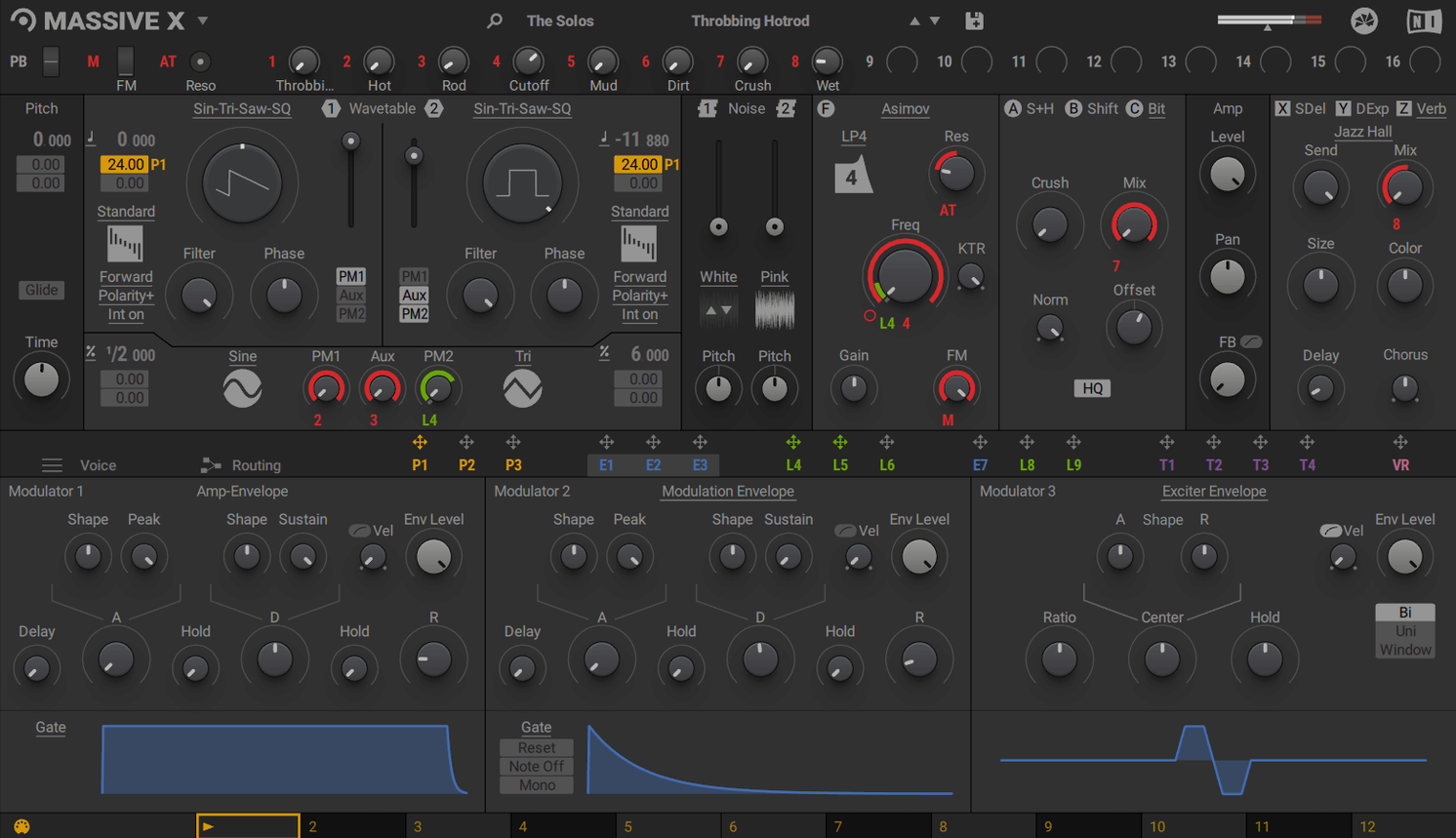
You drop Massive X onto an instrument track when a preset tweak won't cut it and you need to sculpt a sound from the oscillator up. It's a polyphonic wavetable synth, the follow-up to Massive, and it lives entirely inside your DAW—there's no standalone mode. You pick one of 10 wavetable playback modes, route modulation across the synth with a lot of flexibility, and build a patch that moves. The Remote Octave control is a nice touch for firing off Performer patterns right from your keyboard.
Deep modulation for evolving textures and basses
- Building evolving pads and textures with deep modulation routing
- Designing basses and leads where the wavetable position changes over time
- Sound design sessions where you want to start from an init patch, not browse
Requires a host DAW with AVX support
- It only works as a plugin; you need a host DAW to run it
- The factory library starts you off with 780 presets
- Intel Macs require a processor with AVX support
Living with it day to day
I've thrown a lot at Massive X in busy sessions—multiple instances stacked inside Logic, automation lanes twisting a dozen parameters at once, and the occasional moment where I forget I already had six tracks running it. On an Apple Silicon Mac, it stays planted. Patch changes are quick, the GUI doesn't stutter when you drag a modulator across the routing grid, and I haven't had a single crash that I could pin on the synth itself. CPU use is reasonable for what it's doing. You'll feel it when you stack unison voices high and lean on the new oscillator section with both phase modulation generators active, but a single instance rarely punches above its weight class.
RAM sits around what you'd expect from a modern wavetable instrument. NI recommends 6 GB for headroom, and that lines up with my experience. The factory library loads fast enough that you can audition patches without that awkward silence between sounds. Stability on Intel machines with AVX is solid too, though the fan on an older MacBook Pro will remind you it's there.
Wavetable editing left to Serum
Set it next to Serum and the conversation gets interesting. Serum's wavetable editor is built right into the interface—you can draw harmonics and watch them turn into waveforms in real time. Massive X doesn't try to match that. It gives you 170-plus wavetables and 10 playback modes and says, "pick one and start routing." You trade the hands-on wavetable drawing for a modulation system that feels more like a modular rack. Serum is quicker to learn; Massive X rewards you for spending an afternoon tracing signal paths.
Then there's Phase Plant. It's the modular cousin that lets you drop in oscillators, filters, and effects like building blocks. Massive X doesn't go that far into freeform territory, but its routing feels more immediate once you understand the grid. You're not placing modules—you're connecting what's already there. For producers grabbing a massive mac torrent or a massive x torrent to test the waters, the difference shows up fast: Phase Plant asks you to build the architecture, Massive X hands you a deep engine and says "route it."
Compared to the original Massive, it's less of a CPU compromise. Old Massive could run on a potato; Massive X expects a modern machine. But the sonic detail is a clear step forward—cleaner highs, more weight in the low end, and a stereo image that sounds wider without chorusing tricks. If you've searched for a native instruments massive x v1. download, you're getting a synth that doesn't lean on nostalgia.
NKS maps your hardware controls instantly
It plays nice with macOS features without making a fuss. Audio Unit and VST3 versions show up reliably in Logic, Ableton, and Cubase. I've used it inside Komplete Kontrol for the browser integration, and the NKS mapping means your hardware knobs snap to the key parameters—filter cutoff, wavetable position, envelope stages—without any MIDI learn gymnastics. Drag-and-drop from the Finder doesn't do much here since there's no standalone, but dropping a massive vst torrent into your plugin folder and rescanning is straightforward.
Side-by-side with other Native Instruments stuff, it makes sense. It coexists with the original Massive for older projects, and it sits in the Komplete ecosystem naturally. You can run it inside Maschine for beat-focused sound design or patch it through Guitar Rig for effects chains that go beyond the built-in options. It also pairs well with third-party convolution reverbs and delays on a send—the raw oscillator tones take external processing beautifully, especially when you want to push a wavetable pad into ambient territory without the synth's own effects tinting things.
For quick idea capture, the Performer section with Remote Octave triggering becomes a sketch pad. You draw a modulation shape, assign it to a filter or pitch parameter, and play it in from a MIDI keyboard like a rhythmic phrase. That kind of tight integration with how you actually play makes it feel less like a programming exercise and more like an instrument that reacts.
Version 1.7.1 is the latest update. Native Instruments keeps the specifics close, but the dot release focuses on maintenance and compatibility fixes.
- macOS 13 or newer
- Apple Silicon or Intel processor (Intel Macs require AVX support)
- 4 GB RAM (6 GB recommended)
- Internet connection for download and activation
- Graphics card with OpenGL 2.1 or higher support
Questions I actually get
Can I run Massive X on its own outside of a DAW?
No, Massive X does not run in standalone mode. It loads as a VST, VST3, AU, or AAX instrument inside a host application.
What kind of synthesis does Massive X use?
It's a polyphonic wavetable synth with 10 different playback modes, flexible routing, and a large modulation system for shaping sounds.
Notes from the tables 0
Sign in or pull up a chair to leave a note.
No notes on this one yet. They go up after I read them.
More from the VST Plugins page
The whole page VST Plugins 498 MB
Neural DSP Archetype Petrucci
1.0.0
VST Plugins 498 MB
Neural DSP Archetype Petrucci
1.0.0
 VST Plugins 745 MB
Neural DSP Archetype Rabea X
1.0.1
VST Plugins 745 MB
Neural DSP Archetype Rabea X
1.0.1
 VST Plugins 742 MB
Neural DSP Fortin Nameless Suite X
1.0.1
VST Plugins 742 MB
Neural DSP Fortin Nameless Suite X
1.0.1
 VST Plugins 441 MB
Neural DSP Parallax X
1.0.0
VST Plugins 441 MB
Neural DSP Parallax X
1.0.0
 VST Plugins 179 MB
Neural DSP Soldano SLO-100 X
1.0.0
VST Plugins 179 MB
Neural DSP Soldano SLO-100 X
1.0.0
 VST Plugins 340 MB
noteGRABBER
2.0.0
VST Plugins 340 MB
noteGRABBER
2.0.0
 VST Plugins 35 MB
Minuit Solstice
1.2.0
VST Plugins 35 MB
Minuit Solstice
1.2.0
 VST Plugins 117 MB