
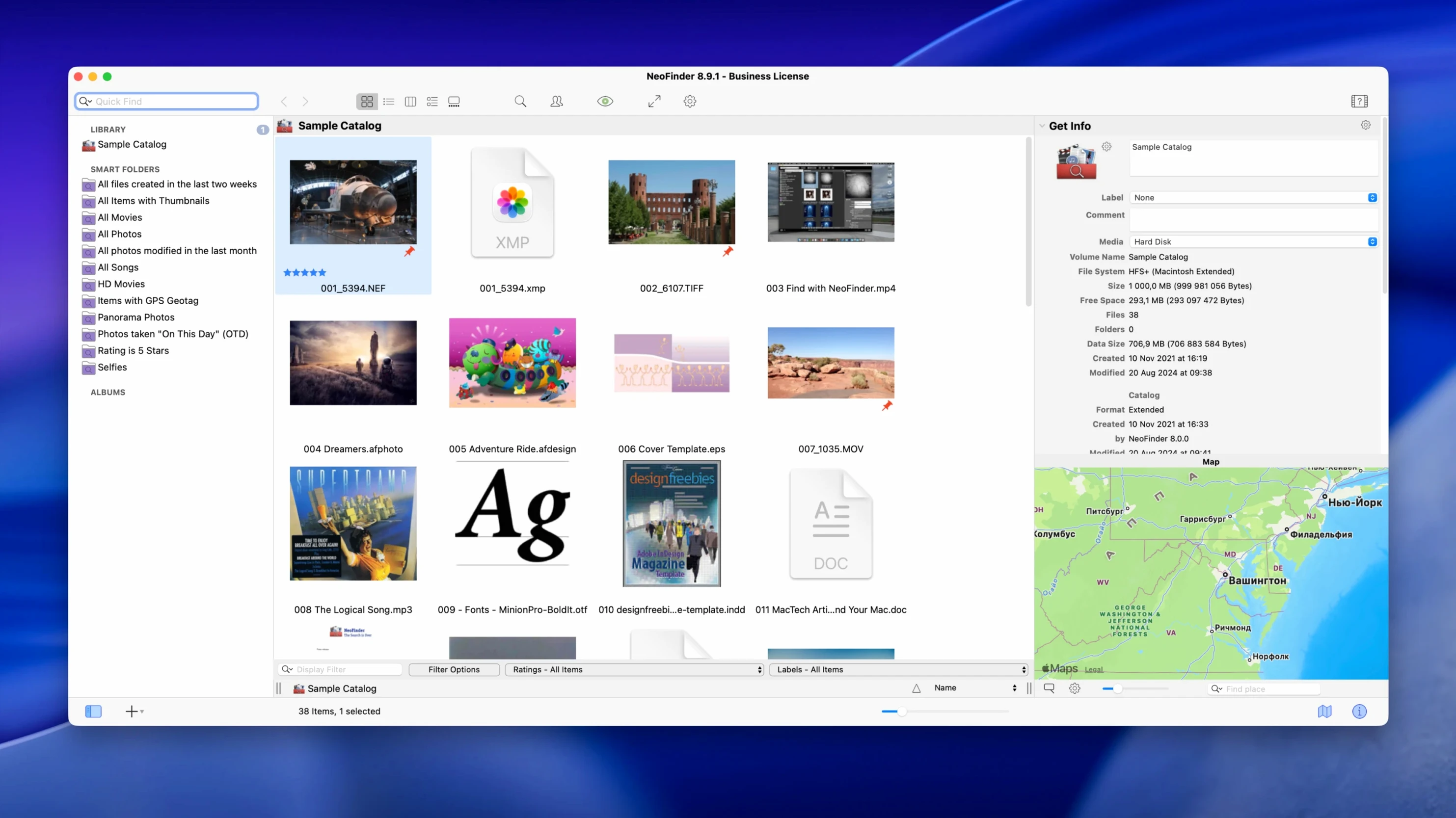
NeoFinder runs on any Mac with macOS 10.15 or newer, natively on both Intel and Apple Silicon machines. It doesn’t need a fancy setup—install it, point it at a disk, and it gets to work building a searchable catalog of everything inside: photos, video files, music folders, documents, you name it.
The real power is in what you don’t have to do. Catalog a shelf of archive drives once, then search across all of them without reconnecting a single one. Thumbnails, XMP metadata, and EXIF info come along for the ride, so you can browse visually or dig into the details. And if you’re particular about file integrity, NeoFinder generates and verifies MD5 checksums so you know nothing’s gone sideways since you put it away.
For the creative folks, version 9.3 added a few things that matter. You can ingest entire media folders in one go, write out multi-line annotations so notes actually make sense later, and create bookmarks to share specific finds with a colleague. There’s also a smart duplicate finder that catches similar photos, not just exact copies—handy after a long import session. The Roxio Toast integration is still there too, if burning discs is part of your workflow.
Photographers, musicians, and video editors with files on a dozen drives
Photographers with years of RAW files spread across a dozen external drives. Musicians juggling sample libraries, stems, and finished mixes. Video editors who archive projects to cheap spinning disks and need to find that one b‑roll clip from 2019. Anyone whose file collection outgrew a single Finder window.
It’s less about profession and more about volume. If you own more than three external drives, or you’ve ever stared at a drawer of labeled DVDs wondering which one has the wedding photos, NeoFinder earns its keep. The people who love it most tend to be organized in theory but messy in practice—they know the file exists, just not which drive it landed on.
Find a two-year-old drone shot in seconds
Imagine a freelance editor wrapping up a corporate project. The client emails about a drone shot from a job two summers ago. She types the client’s name into NeoFinder, filters by video files, and spots the clip in seconds—still cataloged from a drive sitting in a closet across the room. She drags a bookmark to the desktop, hands it off, and gets back to rendering. No drive mounting, no guessing.
Bottom line: think of NeoFinder as your off-disk memory. It doesn’t move your files around; it just remembers where you left them.
Version 9.3 tidies up a few rough edges and brings in some practical new tools.
- Similar-photo detection so you can weed out near-duplicates.
- Ingest entire media folders in one step instead of piece by piece.
- Multi-line annotations for notes that need more than a single sentence.
- Shareable bookmarks to point someone straight to a file in the catalog.
- Assorted bug fixes that keep things running smoothly.
- macOS 10.15 or later
- Intel or Apple Silicon Mac
Questions I actually get
What kind of information can NeoFinder store about my media files?
You can add keywords, descriptions, ratings, and geotags, and NeoFinder also reads embedded metadata like thumbnails and XMP information from the files themselves.
Notes from the tables 0
Sign in or pull up a chair to leave a note.
No notes on this one yet. They go up after I read them.
More from the Mac Apps page
The whole page Mac Apps Updated 333 MB
m’s HalfTone
1.5.3
Mac Apps Updated 333 MB
m’s HalfTone
1.5.3
 Mac Apps 6 MB
Nik Collection
9.0
Mac Apps 6 MB
Nik Collection
9.0
 Mac Apps 3.5 GB
Mp3tag
1.14.1
Mac Apps 3.5 GB
Mp3tag
1.14.1
 Mac Apps 13 MB
Movist Pro
2.17.2
Mac Apps 13 MB
Movist Pro
2.17.2
 Mac Apps 60 MB
Movavi Video Suite
22.4.1
Mac Apps 60 MB
Movavi Video Suite
22.4.1
 Mac Apps 294 MB
Movavi Video Editor
22.4.1
Mac Apps 294 MB
Movavi Video Editor
22.4.1
 Mac Apps 126 MB
Movavi Video Converter
22.5.0
Mac Apps 126 MB
Movavi Video Converter
22.5.0
 Mac Apps 79 MB